![Logo - Secondary White-1.png]](https://help.askcody.com/hs-fs/hubfs/Logo%20-%20Secondary%20White-1.png?height=50&name=Logo%20-%20Secondary%20White-1.png)
You can now register visitors for recurring meetings with the AskCody Visitors Add-in in Outlook. This works the same way as requesting services for recurring meetings: you register visitors on each meeting in the series, not on the whole series at once. This article is for meeting organizers, Personal Assistants and anyone else who books meetings with external guests. If you are new to registering visitors, start with How to use the AskCody Visitors Add-in.
What is a recurring meeting?
A recurring meeting is a series of meetings that repeat at a set frequency, for example daily, weekly or monthly, booked in Outlook. Outlook may call it a recurring meeting, a series or a repeating meeting.
In Outlook, each meeting in a series is its own meeting instance. That is why AskCody registers visitors per instance. It gives you control over who is expected at reception on each date, since guests are rarely the same every time.
Requirements
- Your organization must be on Microsoft Graph. Visitors for recurring meetings became available with AskCody's move to the Graph API. If you are unsure whether your organization has moved, ask your IT Admin.
- The AskCody Visitors Add-in deployed to your Outlook by your IT team, and a user role that gives you access to Visitors.
How to register visitors for a recurring meeting
- Create the recurring meeting in Outlook, if it does not exist already.
- Open the specific meeting in the series that your visitors will attend.
- Open the Visitors Add-in from the ribbon at the top of the Outlook window.
- Select the attendees you want to add to reception.
- Add any notes for the reception team, and choose who should be notified when each visitor arrives.
- Click Add to reception.
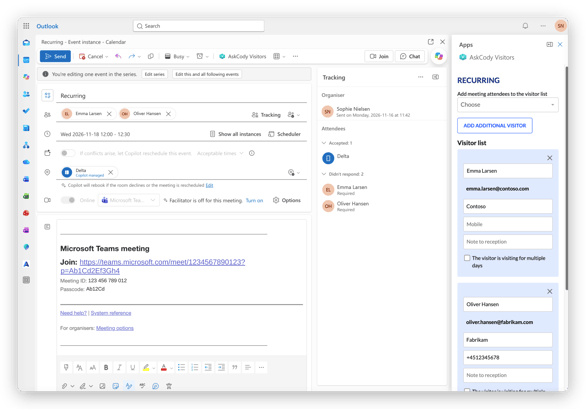
Repeat these steps for every meeting in the series where you expect visitors.
Note
Registering visitors on the entire series, or on This and all following events, is not currently supported. Always open the single meeting your visitors will attend, and register them one meeting at a time.
Moving a meeting with registered visitors
When you change the date or time of a meeting in Outlook, the visitor registration follows the meeting. Reception sees the visitors on the new date and time, and you do not need to register them again.
Services on recurring meetings work the same way. Read How to request services for recurring meetings to learn more.
How visitors from recurring meetings look for reception
Visitors registered on a recurring meeting show up as regular visitors for the Receptionist. They are scheduled for arrival on the date of each meeting they are registered on. There is nothing different reception needs to do.