![Logo - Secondary White-1.png]](https://help.askcody.com/hs-fs/hubfs/Logo%20-%20Secondary%20White-1.png?height=50&name=Logo%20-%20Secondary%20White-1.png)
Info
This article applies when the meetings for a room exist and are visible in Outlook, the Outlook Add-in, and All Bookings, but the room's column in Central stays empty. If the meetings are missing from all AskCody products, this is a different issue. Start with Troubleshooting with error codes.
Central retrieves each room's calendar through Microsoft Graph, and the lookup only resolves a room by its primary SMTP address. Aliases, secondary email addresses, and a User Principal Name (UPN) that differs from the primary SMTP address are not resolved. Outlook and the Outlook Add-in do resolve aliases, which is why the same room can work everywhere else while Central cannot find it.
This means that if a room's calendar is registered in the AskCody Management Portal under any address other than its primary SMTP address, the room still accepts bookings as normal, but its meetings are not displayed in Central.
Note: Before you continue, check the date picker in the navigation bar and confirm you are on the day you expect. Central remembers the date you last selected, so a date left over from earlier in the session is a common reason meetings appear to be missing. Read why the date resets to today in Central, Maps and All Bookings.
How to fix it
First, confirm the room's primary SMTP address with your Exchange administrator, or look it up yourself:
- Open the Microsoft Exchange admin center.
- Go to Recipients > Resources and open the room mailbox.
- Note the address marked as primary under Email addresses.
Then update the room's calendar in the AskCody Management Portal:
- Go to Admin Center > Integrations > Microsoft Exchange Calendars.
- Open the calendar for the affected room.
- Update the Mailbox field to the room's primary SMTP address.
- Click Save.
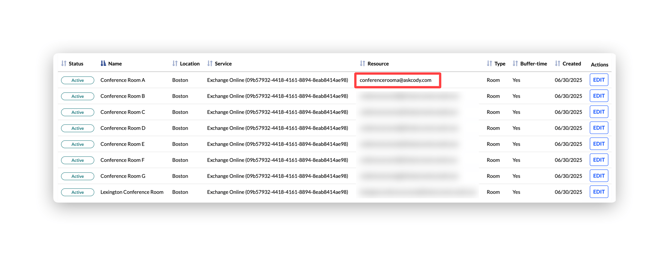
Once saved, Central resolves the room and all of its meetings appear, including bookings made before the change.
Note: Room mailboxes often carry several addresses at once, and the UPN does not always match the primary SMTP address. For example, a room's primary SMTP address can be room-name@domain.com while its UPN is room-name-conference@domain.com. Only the primary SMTP address works in the calendar integration. This is the same requirement described in ErrorNonPrimarySMTPAddress.
Why does this happen?
Microsoft Graph, the API used to sync meeting data between Microsoft Exchange and AskCody, identifies a mailbox by its primary SMTP address. When the calendar integration is configured with an alias or UPN instead, the Graph request for that room's calendar returns "not found", and Central has nothing to display. The bookings themselves are unaffected because Outlook resolves any of the mailbox's addresses.
If the issue persists
If the room's calendar is already registered with its primary SMTP address and the meetings still do not appear in Central, submit a support ticket and include the room's primary SMTP address, its UPN, and a screenshot of the calendar's configuration in the AskCody Portal.