![Logo - Secondary White-1.png]](https://help.askcody.com/hs-fs/hubfs/Logo%20-%20Secondary%20White-1.png?height=50&name=Logo%20-%20Secondary%20White-1.png)
Follow-the-meeting intelligence is the logic behind everything you add to a meeting with AskCody. The meeting in your Outlook calendar is the anchor. The room, the service requests and the visitor registrations are all attached to it, so when you change the meeting in Outlook, they follow without you updating anything else.
This article is for meeting organizers, Personal Assistants who book meetings for others, and the service teams and receptionists who prepare them. It explains what follows the meeting, and the cases where AskCody stops following on purpose.
How follow-the-meeting intelligence works
It starts with one rule: the meeting has to exist before anything can follow it. AskCody recognizes the meeting once the invite has been sent and the event exists in the room's calendar.
- Create your meeting in Outlook, find a room with the AskCody Bookings Add-in and send the invite.
- Reopen the meeting from your calendar and add what it needs: catering or IT equipment in the AskCody Services Add-in, and your guests in the AskCody Visitors Add-in.
- When plans change, change the meeting in Outlook, or drag it to a new time in Workplace Central. Move the time or date, or change the room. Everything you added follows.
Note: Send the invite before you request services. You can request services while a managed room is still waiting for approval. Read how to request services for a meeting with a pending room booking.
What follows the meeting
Every time you change the meeting in Outlook, this is what happens to what you added with AskCody:
- The room booking: moves with the invite. Outlook checks that the room is free at the new time.
- Service requests: when the meeting is rescheduled, the request is updated to the new time and the service provider is notified. When you move the meeting to another room the provider delivers to, the request follows to the new room.
- Buffer time: the time held before and after the meeting for the service team moves with the meeting.
- Visitor registrations: the guests you added in the Visitors Add-in follow the meeting, so reception sees them on the right day.
- Cancellations: when you cancel the meeting, its service requests are canceled too, and the provider is notified.
Follow-the-meeting intelligence works the same way whether a managed room has accepted the booking or is still pending.
Note: Buffer time moves with the meeting, but if you move the meeting in Outlook, Outlook only checks that the room is free for the meeting itself, not for the buffer time around it. Another booking can then sit right next to your meeting and leave no time to prepare.
To make sure the room is free for the buffer time as well, search for the room again in the Bookings Add-in. In Central you see the buffer time blocks while you drag a meeting, so you can see when a new time leaves no room for them.
Rescheduling meetings in Central requires a specific user role. Read what buffer time is and how to set it up.
When following stops, on purpose
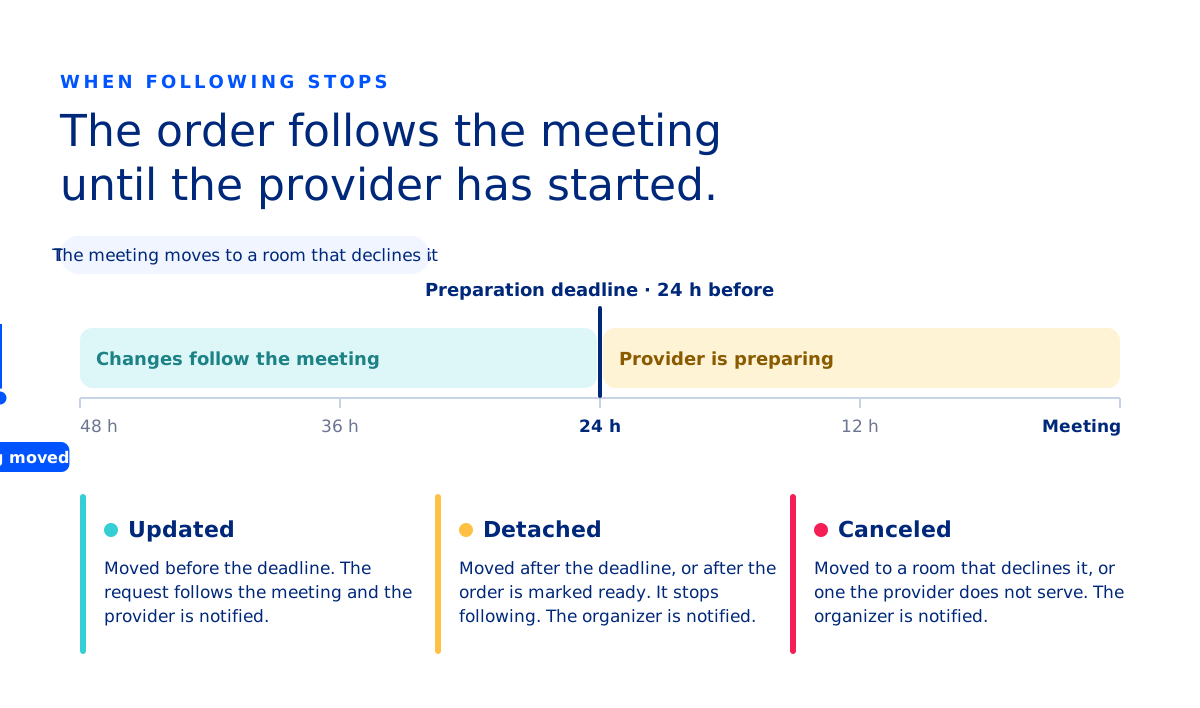
Following the meeting never overrules the people who prepare it. Once a service provider has started, a late change could waste food or work, so AskCody stops the request from following and tells the organizer instead.
When a request is detached
A request is detached from the meeting when the meeting is rescheduled, or its room is changed, after one of these:
- The service provider's preparation deadline has passed.
- The service provider has marked the request as ready.
The meeting organizer receives the notification Your request has been detached. From then on, the request no longer follows changes to the meeting.
Example: The provider's deadline for service requests is 24 hours before the meeting starts. The meeting is rescheduled 6 hours before it starts. The provider may already be preparing, so the request is detached.
Preparation deadlines are set per service provider and per item. Read how preparation deadlines work.
When a request is canceled
A request is canceled, and the organizer is notified, when one of these happens after the request was placed:
- The meeting is moved to a room that declines the invite.
- The meeting is moved to a room the service provider does not deliver to.
- The room is removed from the meeting in Outlook or Teams.
- The meeting is canceled.
How to reactivate a request
If a room delegate declines the room and the request is detached, you can link the request to the meeting again:
- Assign a new room to the meeting in Outlook and send the updated invite.
- Reopen the meeting from your calendar and open the AskCody Services Add-in.
- Select the new room on the request and click Place Request.
Note: If the service provider does not deliver to the new room, you cannot select that provider when you update the request.
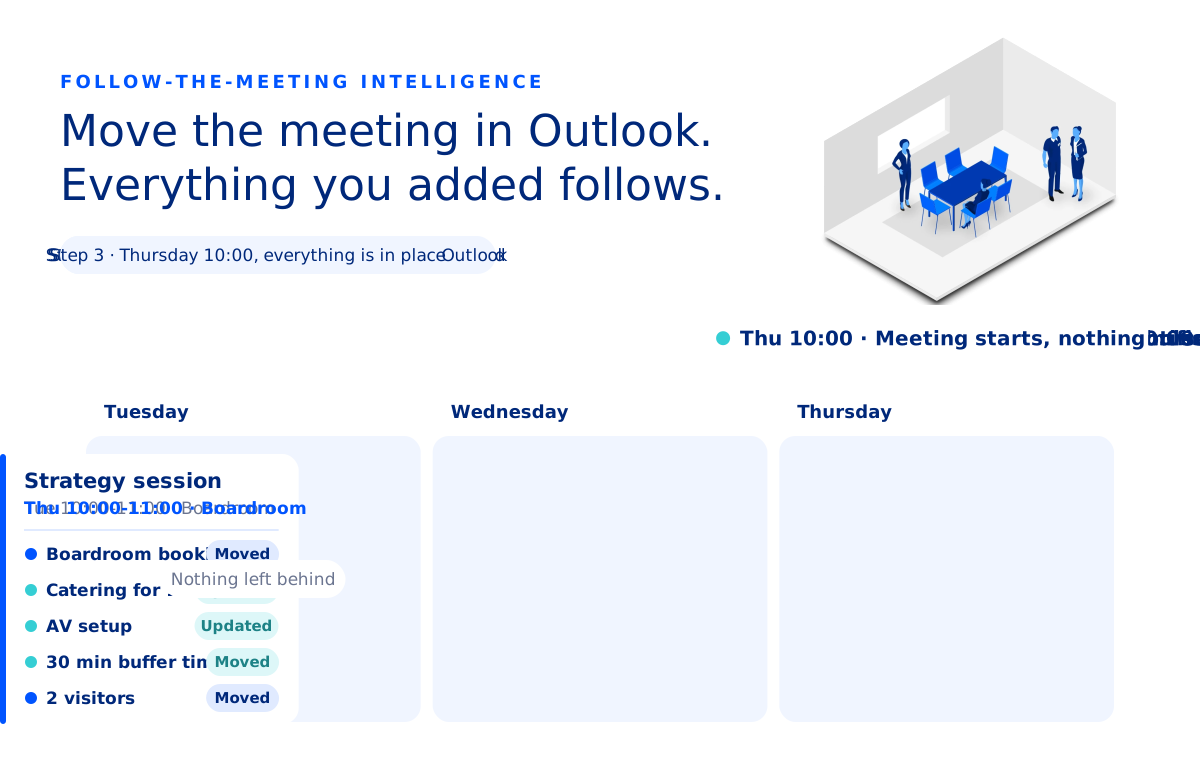
An example: a strategy session moves to Thursday
A Personal Assistant books a strategy session for Tuesday at 10:00 in the Boardroom. She orders catering for 12 and AV setup in the Services Add-in, which also holds 30 minutes of buffer time around the meeting, and pre-registers two visitors in the Visitors Add-in.
On Friday the plan changes, and the meeting has to move to Thursday. She moves the meeting in Outlook and sends the update. That is the only change she makes:
- Outlook checks that the Boardroom is free on Thursday and moves the room booking.
- The catering and AV requests are updated to Thursday, and both providers are notified.
- The buffer time moves with the meeting. Nothing else is booked in the Boardroom around it on Thursday, so the service team still has its 30 minutes to set up and clean up.
- The two visitor registrations move to Thursday, so reception expects the guests on the right day.
Nothing is left behind on Tuesday, and nobody has to chase the change.
Why AskCody works this way
AskCody is built for Microsoft 365 and works with the meeting in your Microsoft Exchange calendar, the same meeting you see in Outlook and Teams. Because everything you add with AskCody is attached to that one meeting, there is no second copy to keep in sync.