![Logo - Secondary White-1.png]](https://help.askcody.com/hs-fs/hubfs/Logo%20-%20Secondary%20White-1.png?height=50&name=Logo%20-%20Secondary%20White-1.png)
What is Visitors Insights?
Receptions are the front line of the visitor experience. Visitors Insights gives your organization a complete overview of how visitors are registered, checked in, and managed across your receptions.
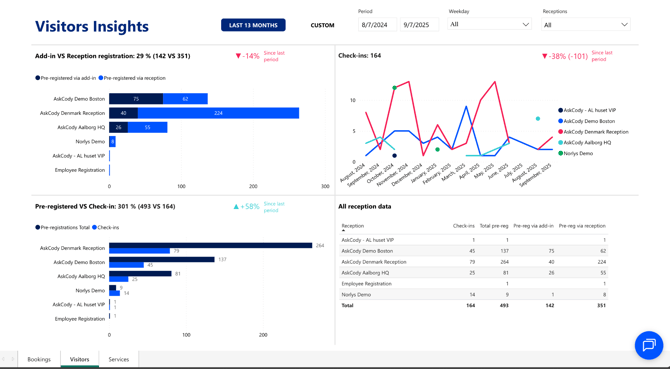
This dashboard helps you understand how employees pre-register guests, how receptions handle check-ins, and how visitor activity changes over time.
Understanding the dashboard
The Visitors Insights dashboard is structured into several sections that help you analyze visitor behavior and reception performance:
-
Add-in vs. Reception registration
Are employees pre-registering guests through the Outlook add-in, or are most visitors registered manually at the front desk? This metric helps you check adoption of pre-registration policies.Questions for analysis:
-
Are employees following visitor pre-registration policies?
-
Which receptions rely heavily on manual registrations?
-
Do some teams or departments consistently skip pre-registering guests?
-
-
Pre-registered vs. Check-ins
How many pre-registered visitors actually checked in? If the numbers don’t match, you may be seeing no-shows or employees forgetting to cancel registrations.Questions for analysis:
-
Are visitor no-shows common in your organization?
-
Are employees forgetting to cancel pre-registrations when meetings change?
-
Is the pre-registration process aligned with actual visitor arrivals?
-
-
Registrations per reception
Shows how visitors were registered at each reception, via add-in or directly at the desk.Questions for analysis:
-
Which receptions depend most on manual check-ins?
-
Are some receptions better at enforcing pre-registration than others?
-
Do specific receptions need more training or staffing?
-
- Visitor check-ins by weekday and time of day
.png?width=670&height=107&name=Untitled%20design%20(6).png)
Displays when your receptions are busiest, both by weekday and by time of day. This makes it easy to identify peak periods and adjust staffing or resources accordingly.
Questions for analysis:
-
Which days and times are busiest at each reception?
-
Are there patterns that repeat weekly or seasonally?
-
When should staff coverage be adjusted to handle visitor peaks?
-
- Visitor check-ins over time
Displays trends in visitor activity across months. This helps spot peaks and plan staffing.
Questions for analysis:
-
-
When are receptions busiest throughout the year?
-
Are there recurring busy seasons, like quarterly reviews, or annual events?
-
Do you need more staff at certain times of year to avoid bottlenecks?
-
- All reception data
A detailed breakdown of check-ins and pre-registrations per reception. Use this to compare locations and identify areas for improvement.
Questions for analysis:
-
-
Which reception handles the most visitors overall?
-
Are visitor volumes consistent across locations, or do some receptions carry a bigger load?
-
Should staffing or resources be adjusted to match visitor traffic patterns?
-
How to use these Insights
Visitors Insights helps you go beyond counting visitors. It enables you to design a better visitor experience:
-
Improve visitor experience: staff receptions appropriately during peak visitor periods
-
Enforce policies: track whether employees are pre-registering visitors as expected
-
Increase operational efficiency: reduce bottlenecks by encouraging pre-registration over manual check-ins
-
Strengthen security & compliance: confirm that all visitors are properly registered and accounted for across all receptions