![Logo - Secondary White-1.png]](https://help.askcody.com/hs-fs/hubfs/Logo%20-%20Secondary%20White-1.png?height=50&name=Logo%20-%20Secondary%20White-1.png)
Overview
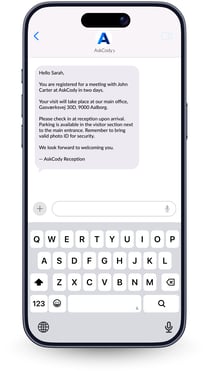
You can now choose exactly when pre-registered visitors receive their pre-arrival notification by email or SMS. Instead of a fixed 30-minute reminder, you can set a custom notification window for each reception: from a few hours to several days before the scheduled visit.
This lets every location tailor visitor communication to its own needs. A headquarters with complex access requirements can notify guests two days in advance, while a smaller office can send a quick reminder one hour before the meeting.
How it works
When a visitor is pre-registered through the Visitors add-in for Outlook, AskCody automatically sends the notification email or SMS at the time you have configured for that reception.
Notification timing
- Each reception has its own notification timing setting.
- You can choose a window ranging from one hour to several days before the visit.
- Both email and SMS notifications follow the same timing. AskCody handles both automatically.
Late registrations
If a visitor is added after the notification window has already passed (for example, if the window is set to three days before but the visitor is registered one day before the visit) AskCody sends the notification immediately.
Front-desk registrations
Visitors registered directly at the front desk are not affected by this setting. They continue to receive notifications based on the time selected at check-in.
Configure notification timing
To set when pre-registered visitors are notified, go to:
Admin Center → Visitors → Receptions
- Open Admin Center
- Go to Visitors, then select Receptions
- Click on Edit on the reception you want to configure
- Under Visitor notifications, choose when pre-registered visitors should be notified

- Save your changes
In order for the custom notification to work, meeting rooms need to be added to the reception: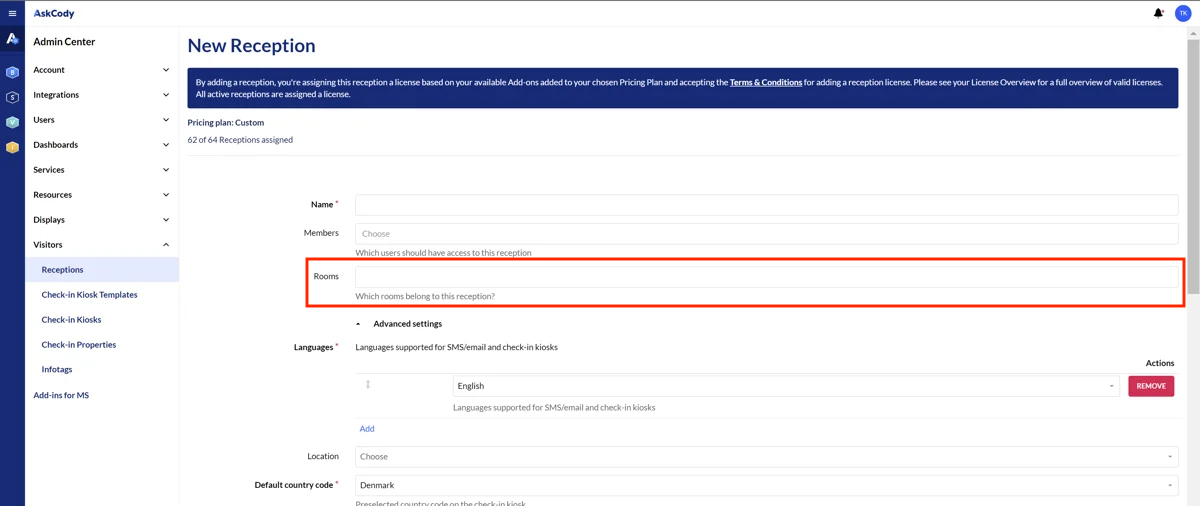
Repeat for each reception that needs a different notification window.
Example
Your headquarters notifies guests two days in advance with directions and parking details. A smaller satellite office sends a simple reminder one hour before the meeting. Each reception is configured independently, so both locations work exactly as needed.